Quickstart
Let's use the univo npm package to load ERC20 Transfer events into our database.
npm install univo viem
import { defineIndexer } from "univo";
import { realtime } from "univo/realtime";
import { wss, local } from "univo/transport";
import { defineStorage } from "univo/metadata";
import { memory } from "univo/metadata/adapters/memory";

import { parseAbiItem, toEventSelector } from "viem";
import type { RpcBlock, RpcTransactionReceipt } from 'viem';

// Create an indexer by providing a `getBlock` function to load block data in realtime from an RPC node,
// a storage adapter for our indexers metadata, and a signingKey to facilitate secure communication.

const univo = defineIndexer({
    getBlock,
    metadataStorage,
    signingKey: process.env.UNIVO_SIGNING_KEY,
});

// univo stores metadata in any S3 compatible object storage. For this quickstart we will just use an
// in-memory store, in production you should use the `s3` or `r2` adapters to ensure that your indexer
// operates correctly and can safely recover from downtime.

const metadataStorage = defineStorage({
    adapter: memory(),
})

async function getBlock(head: { chain: `0x${string}`; number: string; }) {
	const [eth_getBlockByNumber, eth_getBlockReceipts] = await Promise.all([
		rpc({ jsonrpc: "2.0", id: 1, method: "eth_getBlockByNumber", params: [head.number, true] }),
		rpc({ jsonrpc: "2.0", id: 2, method: "eth_getBlockReceipts", params: [head.number] })
	]);

	if (!eth_getBlockByNumber) throw new Error("eth_getBlockByNumber returned null");
	if (!eth_getBlockReceipts) throw new Error("eth_getBlockReceipts returned null");

	return {
        eth_chainId: head.chain,
        eth_getBlockByNumber: eth_getBlockByNumber as RpcBlock<"latest", true>,
        eth_getBlockReceipts: eth_getBlockReceipts as RpcTransactionReceipt[]
    };
}

async function rpc(opts: { jsonrpc: "2.0"; id: number; method: string; params: any[] }) {
    // RPC_URL is any HTTP RPC provider like https://eth-mainnet.g.alchemy.com/v2/YOUR_API_KEY
	const res = await fetch(process.env.RPC_URL, {
		method: "POST",
		body: JSON.stringify(opts),
		headers: { "Content-Type": "application/json" },
	});

	if (!res.ok || res.status < 200 || res.status >= 300) {
		throw new Error("Failed to get rpc response");
	}

	const json: any = await res.json().catch((cause) => {
		throw new Error("Unable to parse rpc response", { cause });
	});

	if (json.error) {
		throw new Error(json.error.message);
	}

	return json.result;
}

const abi = parseAbiItem("event Transfer(address indexed from, address indexed to, uint256 value)");

// Define an event that will upsert every ERC20 Transfer for each Ethereum block
const event = univo.event({
    id: "transfers-erc20-event",

    // Use a filter define the specific blocks we want to index, in this case we only want blocks
    // on Ethereum mainnet where a transaction emitted a `Transfer` event log
    filters: [
        {
            chain: 1,
            fromBlock: 0,
            event: toEventSelector(abi) // "0xddf252ad1be2c..."
        }
    ],

    // Define a handler that maps the raw block data into a list of structured transfer events
    handler(block) {
        return block.eth_getBlockReceipts.flatMap(receipt => {
            return receipt.logs.flatMap(log => {
                try {
                    if (log.topics[0] !== toEventSelector(abi)) {
                        return []
                    }

                    const { args } = decodeEventLog({ data: log.data, topics: log.topics, abi: [abi] });

                    return {
                        id: log.blockTimestamp + log.blockNumber + log.transactionIndex + log.logIndex,
                        to_address: args.to,
                        quantity: args.value,
                        from_address: args.from,
                        token_address: log.address,
                    };
                } catch {
                    return [];
                }
            })
        })
    },

    // Define an adapter to store your events anywhere: Postgres, S3, ClickHouse, etc.
    storage: {
        async upsert(transfers) {
            console.log(transfers);
            // [{ id "...", to_address: "...", quantity: ..., from_address: "...", token_address: "..." }]
        }

        async delete(transfers) {
            // Invoked when a chain reorganisation occurs and events must be removed from storage
        }
    }
})

// Define an action to invoke for every ERC20 event that finalizes on-chain
univo.action({
    event,

    id: "transfers-erc20-action",

    handler: async (event) => {
        console.log(event);
        // { id "...", to_address: "...", quantity: ..., from_address: "...", token_address: "..." }
    }
})

// NODE_URL is any WebSocket RPC provider e.g. wss://eth-mainnet.g.alchemy.com/v2/YOUR_API_KEY
const node = wss(process.env.NODE_URL);

// Begin processing indexer in realtime since the latest finalized block
realtime({ node, indexer: local(univo) });
Using nothing but your RPC connection, your indexer will now be writing ERC20 events directly into your storage system since the latest finalized block. univo will automatically handle chain reorganisations, cryptographically verify returned RPC responses, invoke any actions you define when your events finalize on-chain, and recover from any downtime so it never misses a block.
univo supports any EVM-compatible chain, including faster chains like Robinhood. The interface is storage agnostic and can support any OLTP system like Postgres, or MySQL as well as any OLAP system like ClickHouse, or DuckDB. univo operates on the write-path only, how your application reads data from these storage systems is entirely in your control. This makes univo easy to integrate into your existing application.
Once your indexer is processing blocks in realtime, learn how the univo dashboard can provide fast and affordable backfills of your events from historical block data.
Architecture
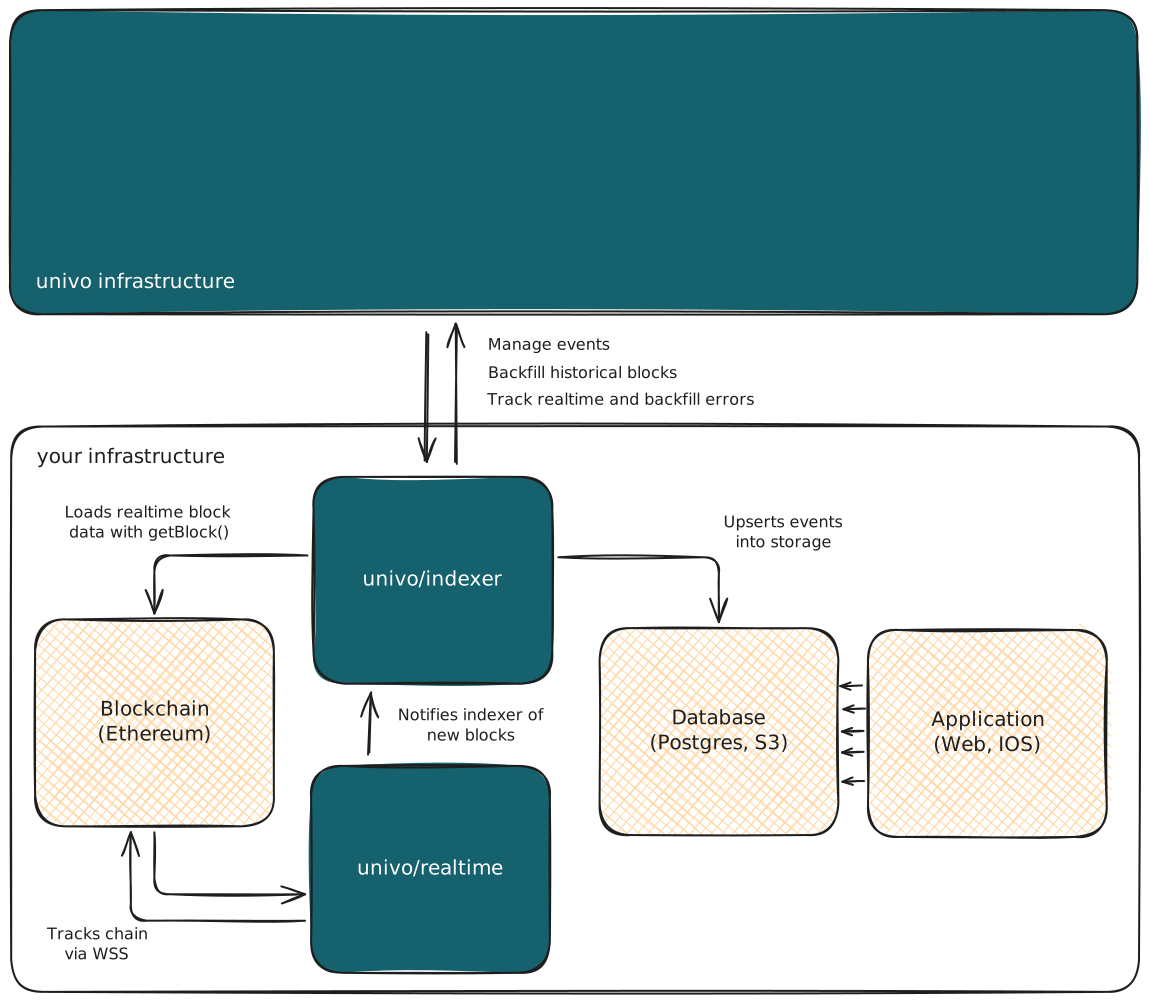
Our architecture is designed so that it can be deployed entirely within your own infrastructure. We intentionally do not and will not offer a hosted service. It is fundamentally important that realtime indexing does not rely on any centralized service, allowing you to minimise vendor lock-in and maximise the availability of your application.
Metadata
The metadata layer ensures that your indexer processes each chain correctly. Currently, we support any S3-compatible object store using the s3 adapter from univo/metadata/adapters/s3. We also offer native support for Cloudflare via the r2 adapter from univo/metadata/adapters/r2-binding. In future, will plan to support storage systems better suited for metadata like Postgres and MySQL.
Indexer
The indexer is responsible for loading realtime block data via the getBlock function, transforming that raw block data using your defined handler function, upserting the returned events into your database using the provided storage adapter, and invoking any actions you have defined for your events.
The indexer is designed to be a simple stateless service. This means it can be deployed to both serverless functions and long-running containers depending on what works best for your team.
Realtime client(s)
The realtime client is responsible for tracking new blocks produced for each EVM blockchain you want to index. Functionally, it does this by establishing and maintaining a WebSocket connection with an RPC node.
As the chain produces new blocks, the realtime client will notifies your indexer. It ensures the chain is correctly processed by maintaining an internal representation of the chain. When a reorged block is encountered, the realtime client reconciles its conflicting local chain with the canonical remote chain before notifying your indexer to process any new blocks.
The realtime client is a stateful service managing WebSocket connections therefore it must be deployed in a long-running container. You are expected to run a realtime client for each of the chains your application wants to index.
Filters
Filters let you define the specific blocks you want to index. Blockchains are massive datasets and most of the time we are only ever interested in small portions of it. Sometimes that can be specific events like ERC20 transfers and other times it could be all events performed by a specific contract. Filters provide a simple way for an event to define exactly which blocks we want to index.
Filters reduce costs and improve backfill performance by ensuring we only index the blocks we need and ignore the blocks that don't have the data we are interested in.
By default your event will not index any blocks, you must opt-in to indexing by providing atleast one filter. Filters are composed of five properties:
chainnumberrequiredindex blocks with this chain idfromBlocknumberrequiredindex blocks from this start block (inclusive)toBlocknumberindex blocks until this stop block (inclusive)addressstringindex blocks that involve this addresseventstringindex blocks where this event topic was emitted
Each property provided in the filter operates like an AND statement. For example, if you specify an address and an event it implies that you only want to index blocks where the specific address emitted the specific event topic provided.
However, when multiple filters are defined for a given event those filters operate like an OR statement. For example, if we define a second filter looking for a different address and event our event will now index any block that matches either the first filter or the second filter.
Filters are a rudimentary method to dramatically reduce the number of blocks your application needs to index. Any advanced filtering should be performed in the event handler itself.
Handlers
When a block matches any of filters defined by your event it will be passed to the handler function to be synchronously transformed into a list of structured events.
The shape of the input block data is determined by the return value of the getBlock function. Generally, the input block is an object where each [key, value] pair corresponds to a raw RPC [method, response] returned by your blockchain node. This generic format allows you to support the full range of RPC data available to you from your node. Indexing new RPC data is as simple as modifying the getBlock function to call that method and return that data. This flexibility is important in cases where some methods are supported on specific chains only.
Note that there is a minimum set of RPC methods expected on the response from your getBlock function, notably eth_chainId, eth_getBlockByNumber and eth_getBlockReceipts. These are expected so that we can safely match each block processed against your event filters.
The returned output value should be an array containing any valid JavaScript values. Each event that you return from your handler should not depend on any information outside of the input block data. It should directly map a given input (the raw block) to a given output (structured events). This ensures that your handler remains idempotent and that repeated calls with the same input block produce the same output events.
Storage
After a block is transformed into a list of structured events they are passed to your storage adapter in batches. A storage adapter defines two asynchronous methods upsert and delete:
upsertis responsible for upserting a given batch of events into your storage system. This function is invoked every time a new block is produced during realtime indexing or when a historical block is received during backfills. The primary rule of this function is that it must be idempotent. Functionally, this means that if the same batch of events is upserted multiple times it only produces a single set of events in your storage system.deleteis reponsible for deleting a given batch of events from your storage system. This function is only invoked during realtime indexing when a chain reorganisation occurs and ensures that any events previously written to storage from a block that was reorganised (no longer included in the canonical chain) are removed.
The storage adapter interface is designed to be agnostic so that you can easily support different types of off-chain storage. This allows you to use any off-chain storage that makes sense for each of your events. It is trivial to use a RDBMS like Postgres or MySQL for one event, an analytics store like ClickHouse for another, and a regular Key-Value store like Object Storage for another. By implementing the two methods above alone, we are able to correctly replicate on-chain data into your off-chain storage.
Actions
Blockchain applications often need to do more than store events, sometimes you want to react to them. Actions allow you to define fire-and-forget effects that are invoked when an event finalizes on-chain. This allows you to perform any asynchronous operation like:
- Alerts: Perform notifications like sending emails when a customer deposit is received.
- Monitoring: Track on-chain data like your de-fi position health factor and act in response.
Actions can be extremely powerful when combined with a durable execution framework like Temporal, Inngest, Trigger.dev, Cloudflare Workflows, or Restate.dev to perform more advanced workflows. This allows you to chain together multiple steps, gracefully handle failures and retries, and provide observability into every invocation.
Actions are only ever processed during realtime indexing for events that have finalized on-chain. They will never execute for any events that could be reorganised and they are never executed when performing a backfill of your events. Actions are invoked with at-least-once delivery. This means that your indexer will not finalize a given block until it achieves a non-erroring execution of your handler. However, this also means that your action may be invoked multiple times. It is important that your handler code is resilient to this by making correct use of an idempotency key - usually the unique identifier of the event passed to your handler.
// Define an event for your storage system
const event = univo.event({ ... });

// Define an action to invoke when the returned events finalize on-chain
univo.action({
    event,

    id: "human-readable-identifier",

    handler: async (event) => {
        // Perform any generic asynchronous handling
    }
})
Backfills
Once your indexer is processing events in realtime, you'll likely want to backfill your events from historical block data. Backfilling for historical data is different than realtime data, notably we do not use your defined getBlock function. This would be both slow and expensive because blockchain RPC nodes are not designed for this kind of data access. To reduce costs and maximise performance we have developed the univo dashboard.
Your indexer exposes a standard HTTP fetch handler (req: Request) => Promise<Response> that can be deployed using any of your favourite frameworks like Next.js, Cloudflare Workers, or Bun. This fetch function - and the accompanying signingKey you defined on your indexer - are what allow the dashboard to securely send your indexer historical block data.
const univo = defineIndexer({
    getBlock, // Defined earlier
    metadataStorage, // Defined earlier
    signingKey: process.env.UNIVO_SIGNING_KEY, // Ensures secure communication with indexer
});

// Deploy the standard (req: Request) => Promise<Response> `fetch` handler, e.g. Bun
Bun.serve({ fetch: univo.fetch, port: 3000 });
Once deployed you can navigate to the dashboard and add your HTTPS endpoint. From there you can choose the specific event(s) you want to backfill. Backfills can be stopped manually at any time, and will also be stopped automatically if it encounters any persistent errors with your endpoint and fails to process a block. Currently we support backfills on the following chains:

Ethereum (Mainnet)
Note that realtime indexing supports all EVM chains and only requires a single RPC node connection. The limited support only applies to backfilling historical data and we will be adding more EVM chains soon.
Pricing
Your first 10,000,000 blocks backfilled are free. After that, backfills are charged at $10 USD per million blocks.
Backfills only charge for blocks successfully delivered to your endpoint. This means any retries caused by transient failures in your endpoint to process a block are free, and you will only be charged once that block is successfully processed and your events are upserted to storage.